Sell through WhatsApp.
Like a pro.
A real shop page at your own address: categories, photos, options, delivery and coupons. The customer builds the order and taps Send. It lands in your WhatsApp itemised, with their details, and you close the sale in the chat.
▪ 2 × Butter Croissant (Almond cream)
▪ 1 × Caffè Latte (Large, Oat)
Total: RM24.80
Three steps. No commissions.
Build your WSAP Shop
Add products with photos, prices and options. Group them into categories. Switch on the checkout fields you actually need. Takes an afternoon, not a developer.
Share your shop link
One address like wsap.me/yourshop. Put it in your Instagram bio, print the QR on packaging, send it in a WhatsApp broadcast.
Close the sale in WhatsApp
Every order arrives as a single, itemised message with totals and contact details. Confirm payment, arrange delivery, done.
Designed to look like you. Built to sell.
Looks like your business
Cover photo, logo, accent colour, opening hours, social links. Your customers see your brand, not ours.
Engineered to close the sale
Options with price extras, a cart that updates live, coupons validated on the spot. Fewer questions, faster yes.
Delivered to WhatsApp, organised
Order number, every line item with options, subtotal, delivery, discount, total, customer details. Nothing to retype.
Built for the way you actually sell.
Tap any card. Each one is live: click the options, apply the coupon, flip the switch.
Options that match reality
Size, filling, toppings. Single or multiple choice, each with its own extra price. The total updates as they tap.
A checkout shaped like your business
Name, phone, address, city, notes. Make each one required, optional or hidden. Ask only what you need.
Delivery with real pricing
Pickup, local delivery, courier. Each with its own fee and note. The customer picks, the total updates, the choice rides into the order.
Coupons your regulars remember
Percent off or a fixed amount. Validated live in the cart. Usage and total discount tracked per code.
The sign on your door, online
One switch. Closed for the night? Customers can still browse, but the Send button waits until you reopen.
Every order, every state
Pending, confirmed, completed, cancelled. Searchable list with a Chat button next to each order. CSV when you need it.
From here, you run everything.
Real screens from a WSAP shop. Every tab below is a page you get the moment you create your shop.

Your last 30 days at a glance: order value, number of orders, average order and customers, each compared with the previous 30 days. Recent orders with a Chat button that opens WhatsApp with the order number already typed.
- Trends vs previous period
- Recent orders with one-tap Chat
- Quick actions and a share box with QR

Add a product in under a minute: name, price, category, description, photo. Options are typed as plain text, one group per line, with extras in brackets. Hide, reorder or edit any time.
- Photo upload, resized automatically
- Options with price extras
- Hide and reorder without deleting
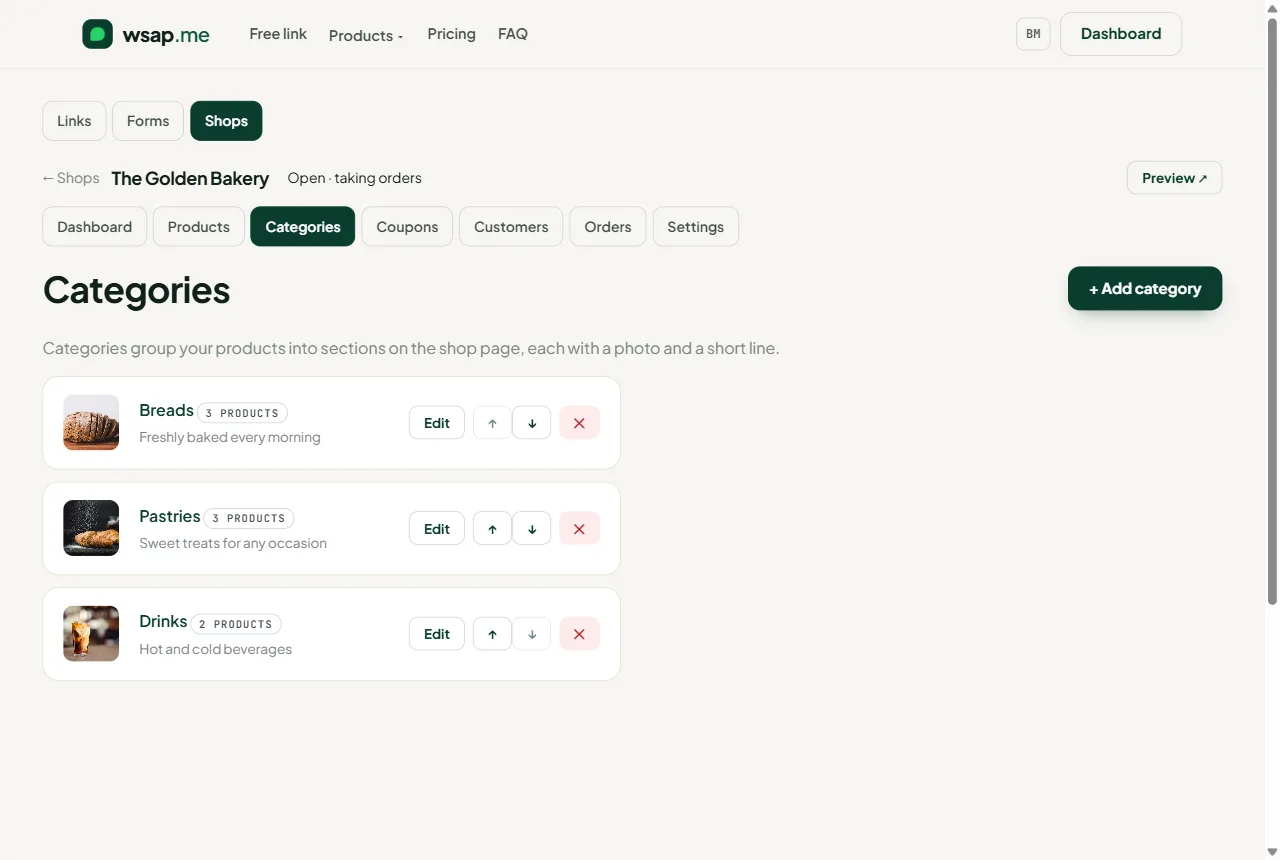
Categories become the sections of your shop page, each with a photo and a one-line description. Order them the way you want customers to browse.
- Photo and description per category
- Drag order with arrows
- Product count per category
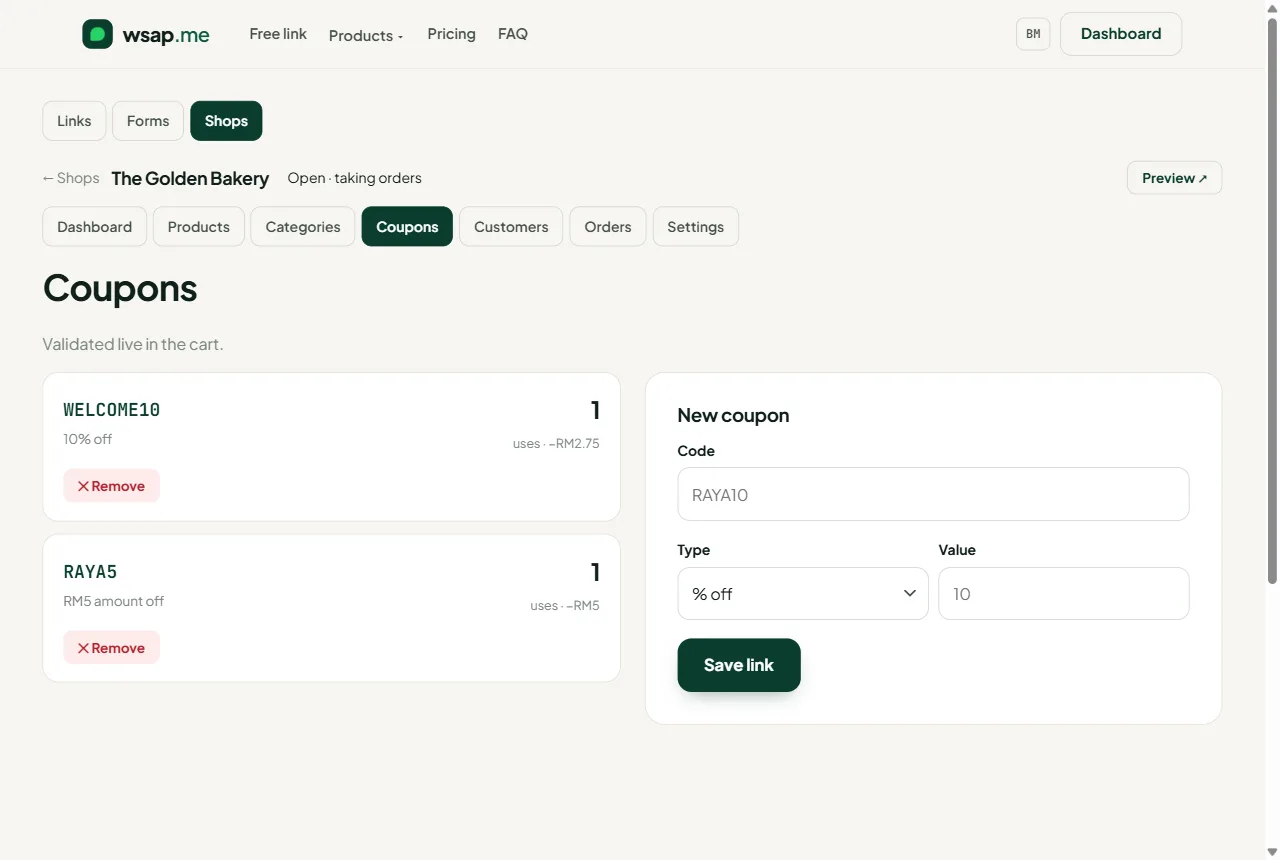
Create a code in seconds: percent off or a fixed amount. See how many orders used it and the total discount it cost.
- Percent or fixed amount
- Usage count and discount total
- Remove any time
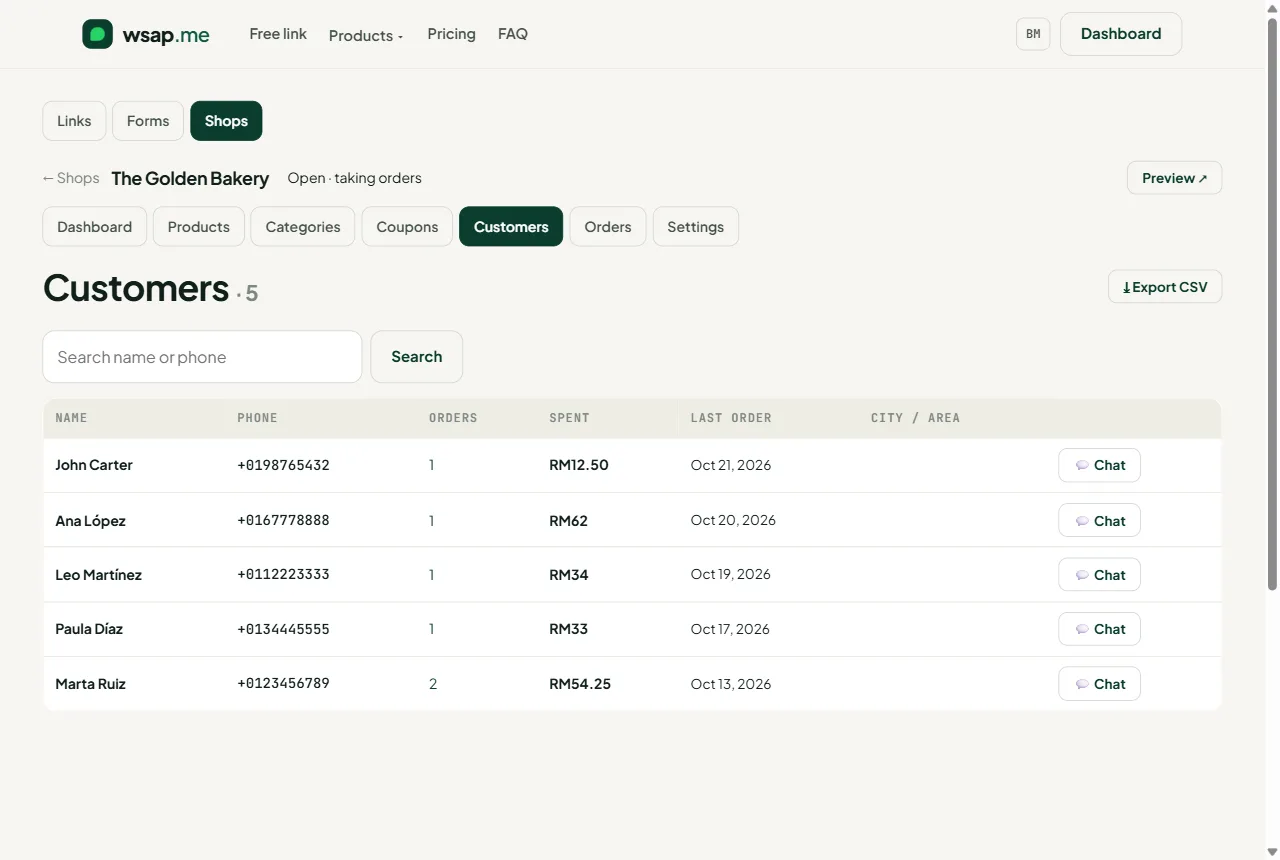
Built automatically from orders. Who ordered, how many times, how much they spent, when they last came. Chat button next to every name.
- Order count and total spent
- Last order date and city
- CSV export
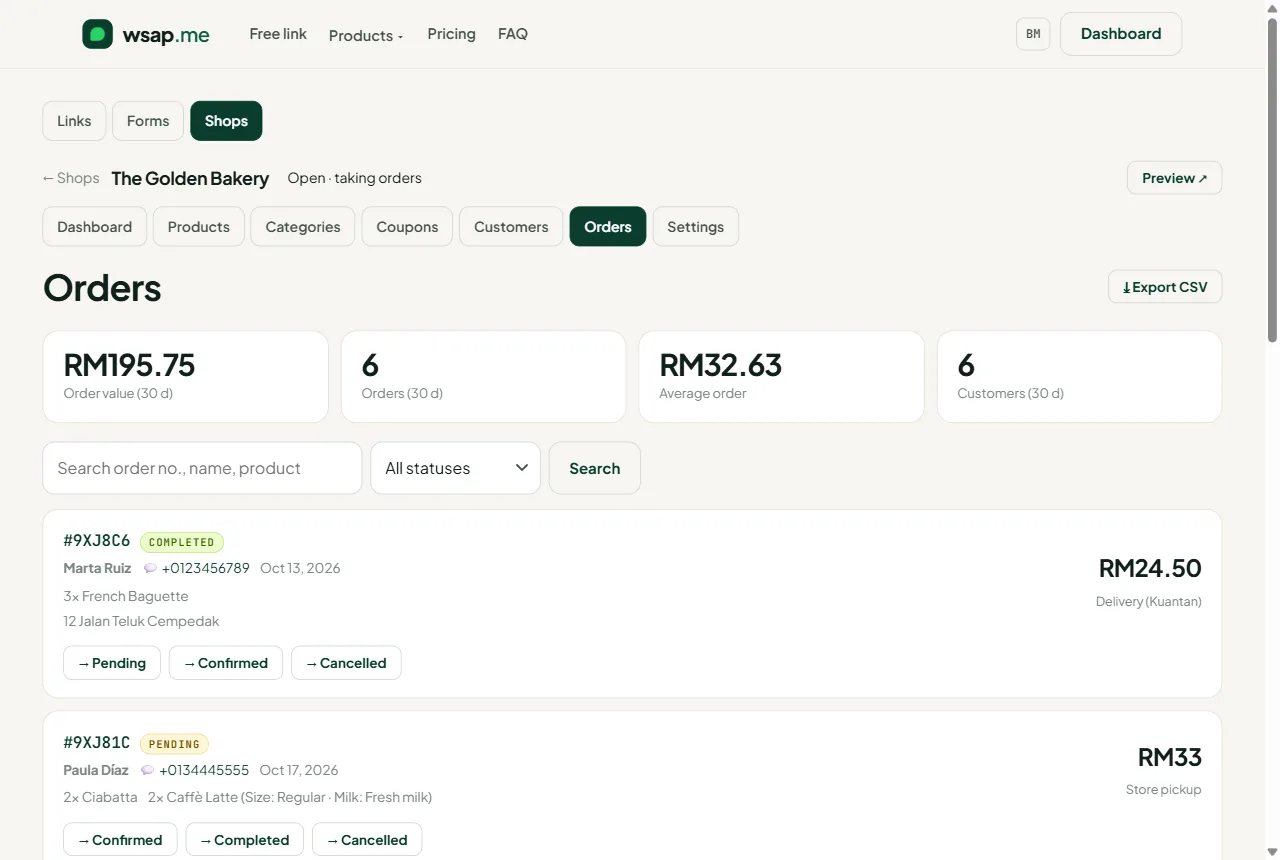
Every order with its items and options, delivery method, coupon, total and the customer's details. Filter by status, search by name, product or order number, export to CSV.
- Status filter and search
- One-click status change
- Chat with the customer about this order
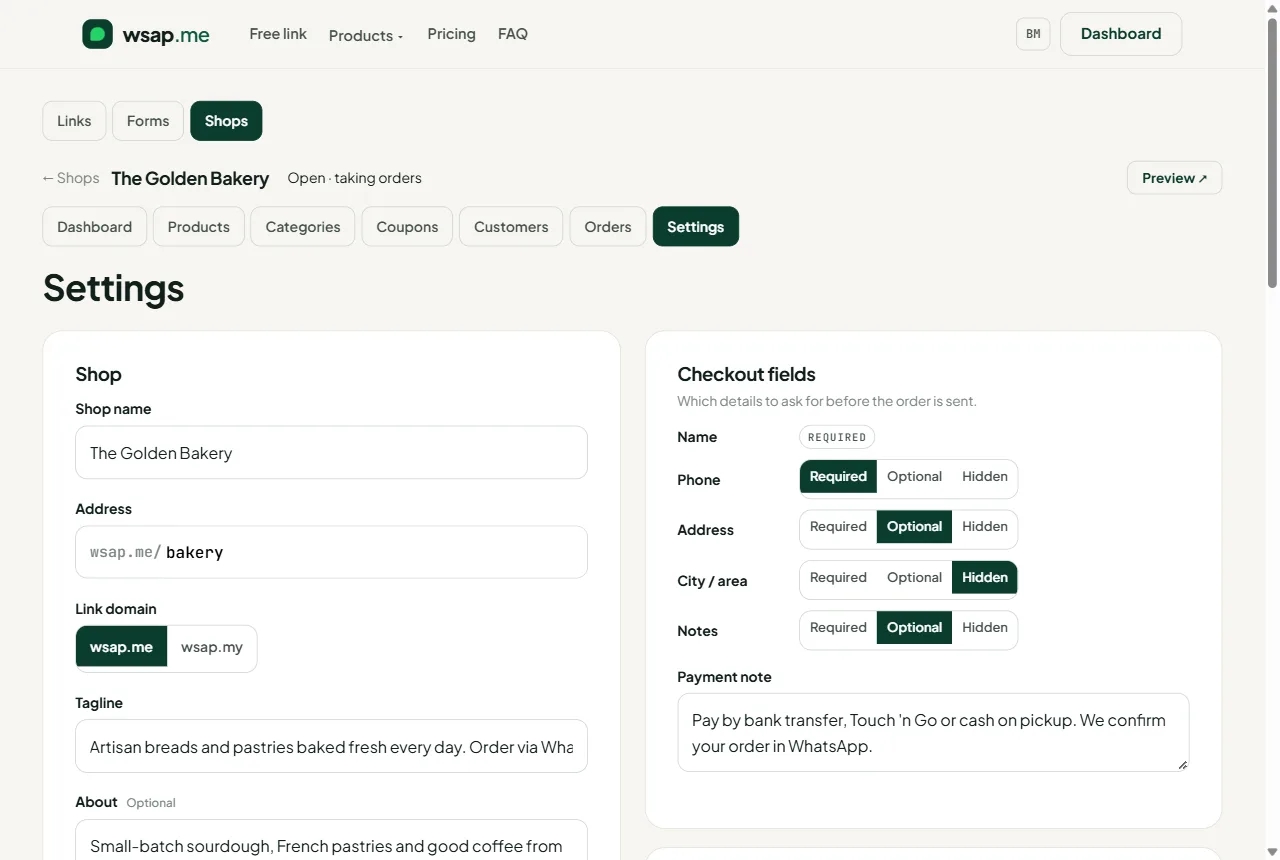
Name, address, tagline, logo, cover, accent colour, opening hours, social links, currency, checkout fields, delivery methods, payment note, open/closed switch.
- Branding and social links
- Checkout fields: required, optional, hidden
- Delivery methods with fees
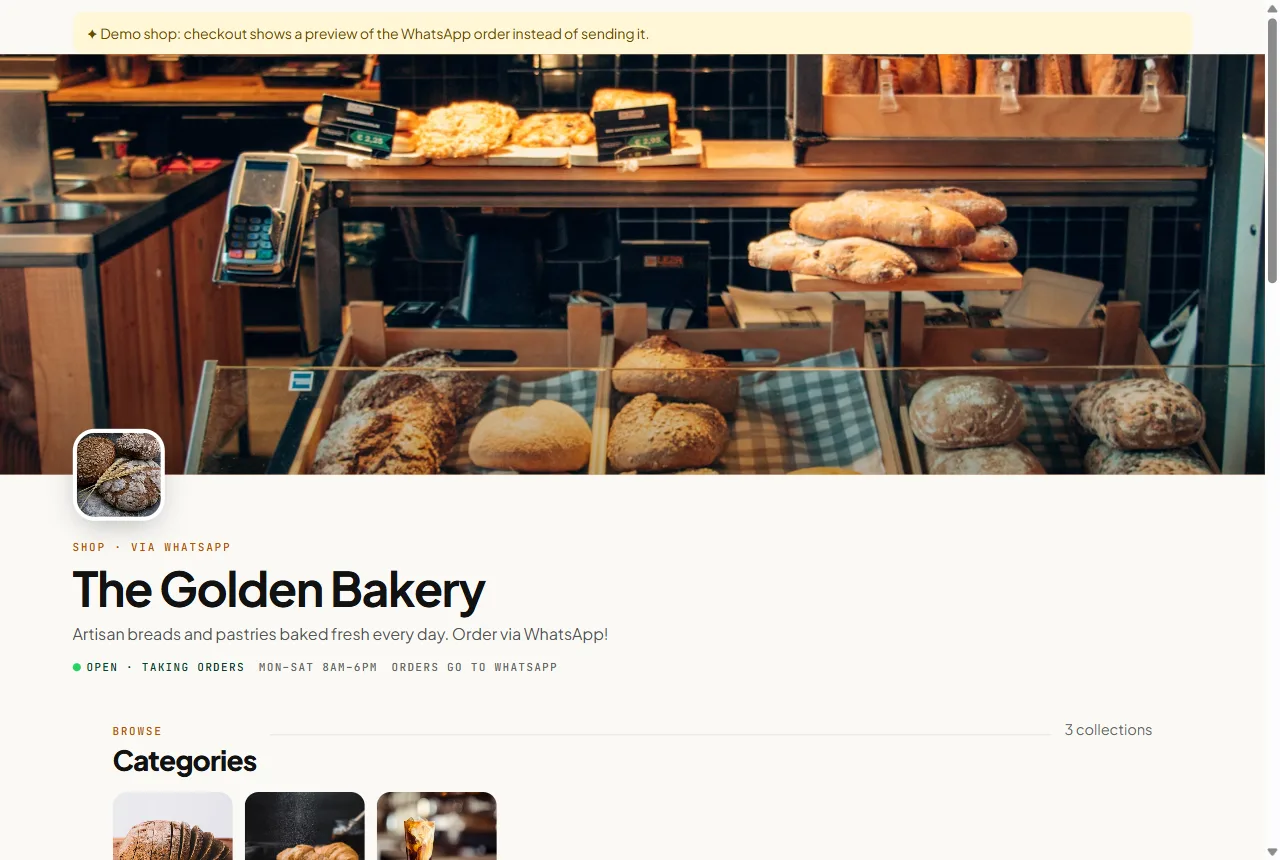
What customers see at wsap.me/yourshop: cover, logo, open status, category tiles with photos, numbered sections, product cards.
- Your brand, your colours
- Category tiles and sections
- Works on any phone, nothing to install

The cart: quantities, options, delivery choice, your fields, coupon, live totals, your payment note. Then one tap sends the order to WhatsApp.
- Live totals
- Coupon validated in the cart
- Payment note shown before they send
A better shape than the rest.
| Marketplace / e-commerce platform | WSAP Shop |
|---|---|
| 5–15% commission or RM100+ a month | RM199 a year, zero commission |
| Buyer chats go through their app | Every order lands in your own WhatsApp |
| Their brand, their layout | Your logo, cover, colours, address |
| Payment held, released later | Customer pays you directly, your way |
| Customer data belongs to them | Customer list and history are yours, CSV any time |
| Weeks to set up a proper store | Live this afternoon |
RM199 a year. Build it free.
Set up the whole shop as a draft at no cost. Pay when you publish. Unlimited products, orders and customers. No commission, ever.
Everything inside. Nothing extra.
- Unlimited products and photos
- Categories, options, coupons
- Delivery methods with fees
- Checkout fields you choose
- Orders, customers, CSV export
- Dashboard with 30-day metrics
- Open/closed switch
- Your own wsap.me address
Pay by FPX, Touch 'n Go, GrabPay, Boost or card via Billplz.
Questions before you start.
What is included for RM199 a year?
Do I need WhatsApp Business?
Can customers pay online?
Do I keep a record of orders and customers?
Can I try it before paying?
What happens when the year ends?
One product, every variation.
Type options as plain text: Size: S, M, L (+2). Add a star for multi-select groups like toppings. Required groups must be chosen before the item goes in the cart, so you never get a vague order.
Ask only what you need.
Every checkout line is a switch: required, optional or hidden. A pickup-only cafe hides the address. A courier business makes it required. Change it any time; the form follows.
Offer every way you deliver.
Add as many methods as you have, each with a fee and a short note such as 'same day before 2pm'. The chosen method and its fee are written into the WhatsApp order, so you know exactly how to fulfil it.
A code for every channel.
Give Instagram its own code and the flyer another. The coupons page shows how many orders each one brought and how much discount it cost, so you know which channel pays.
Close without disappearing.
When you flip the switch off, the storefront shows 'Closed for now' and the order button is replaced with a note. Your catalogue stays visible, so tomorrow's customers still browse tonight.
From pending to completed.
New orders appear in your dashboard the moment they are sent, with the same order number the customer sees in WhatsApp. Move them along with one click; the history stays searchable and exportable.